Agents Software Explained: What It Is and When You Need It

“AI agents” are everywhere in 2026, but the term is still used loosely. For operators and product leaders, what matters is simpler: agents software is the layer that lets AI move from “answering questions” to taking actions across your tools and workflows, with guardrails.
If you have repetitive, high-friction work that lives across email, CRMs, calendars, ticketing systems, spreadsheets, internal portals, or voice calls, agents software can turn that work into a fast, auditable workflow. If you do not have stable processes, clean data, or clear risk controls, it can also become an expensive experiment.
What is agents software?
Agents software is software that orchestrates an AI model to plan and execute tasks using tools (APIs, databases, internal systems, browser actions, telephony, RPA, and so on), rather than only generating text.
A practical definition:
- A chatbot answers: “Here’s how to submit a refund.”
- An agent (with the right permissions) can: verify eligibility, create the refund request in your system, notify the customer, and log the action.
This is why agents software is often described as “LLM + tools + control plane.” The model provides reasoning and language understanding. The agents software provides the capability and safety to do work.
Agents software vs chatbots vs automation
Many teams already have “automation.” The key difference is how the workflow is handled when real-world inputs are messy.
- Traditional automation (workflows, scripts, RPA) is excellent when steps are predictable and inputs are structured.
- Chatbots are excellent at answering questions and drafting content, but often stop short of completing a workflow.
- Agents software shines when tasks are multi-step, cross-system, and filled with ambiguity (free-text emails, PDFs, voice calls, partial data), while still requiring reliability.
How agents software works (the building blocks)
Most agent implementations follow a loop: understand intent, plan steps, call tools, verify results, and either finish or ask for clarification.
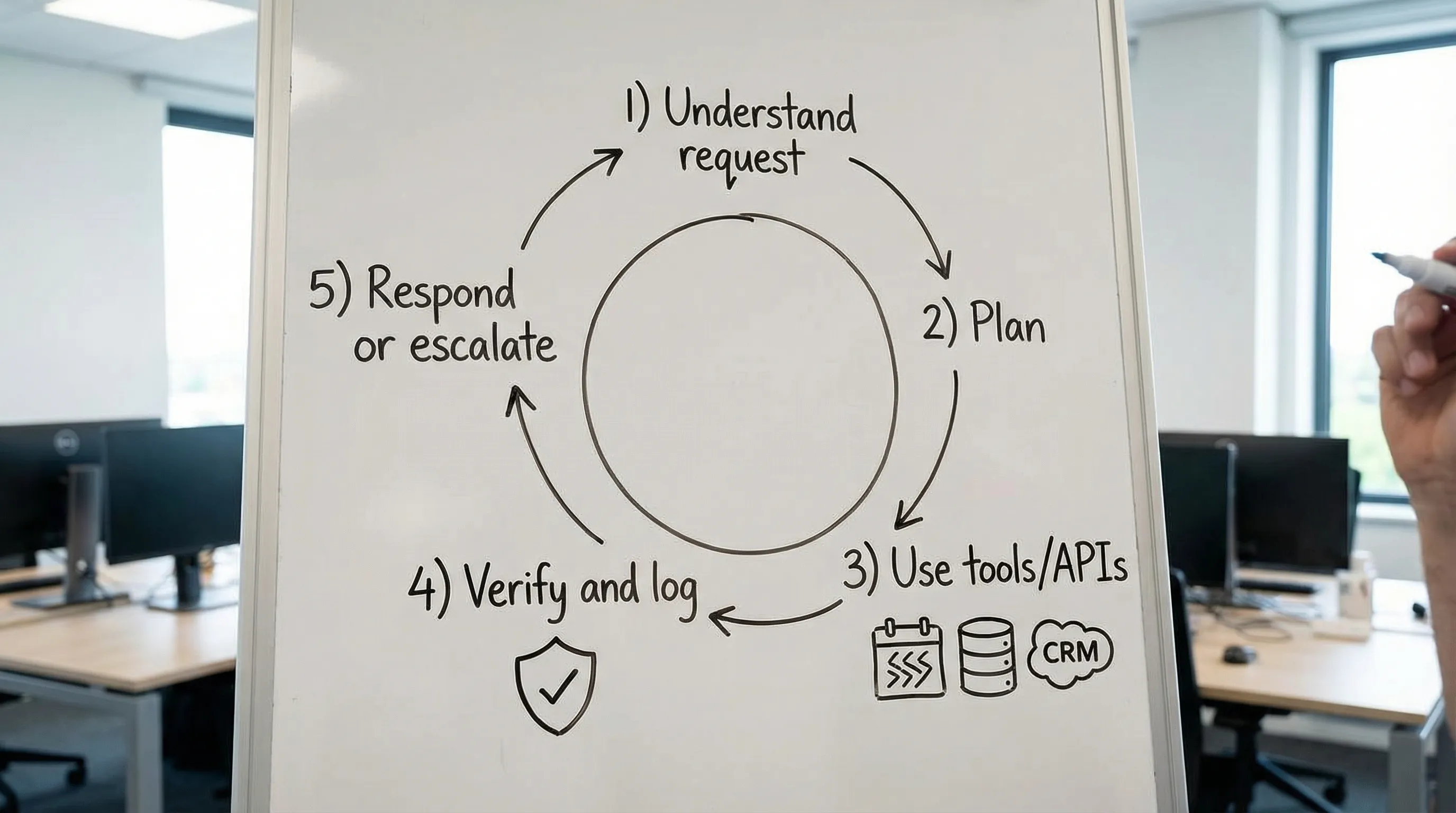
Here are the core components you typically need for production-grade agents software.
| Component | What it does | Why it matters in real deployments |
|---|---|---|
| Model layer (LLM, speech-to-text, vision) | Interprets language, documents, or audio, and produces decisions or structured outputs | The model alone is not the product, it needs constraints and integration to create business value |
| Tooling layer (functions, APIs, RPA) | Lets the agent take actions (create tickets, update CRM, schedule meetings) | Agents are only useful if they can do work inside the systems you already run |
| Orchestration (planner/executor) | Breaks tasks into steps, selects tools, handles retries, and sequences actions | This is where “agent behavior” becomes reliable rather than improvised |
| Context and memory | Pulls relevant data (customer profile, policies, prior tickets) and stores outcomes | Better accuracy, fewer back-and-forth questions, and consistent decisions |
| Guardrails and policy | Limits what the agent can do (permissions, allowed actions, escalation rules) | Reduces security and compliance risk, and prevents “creative” actions |
| Observability (logs, traces, evals) | Records what happened, why it happened, and whether it worked | Without this, you cannot debug, audit, or improve agent performance |
A common misconception is that agents are just “prompting.” In practice, the engineering work is about integrations, failure handling, evaluation, and security.
Common types of agents software (and what each is good at)
Not every “agent” needs autonomy. In many businesses, the best ROI comes from assistive agents that complete well-defined tasks, with human approval when risk is high.
1) Copilot-style agents (human-in-the-loop)
These agents sit inside a UI (web app, CRM extension, internal portal) and accelerate a user’s job:
- Drafting responses, proposals, or summaries
- Generating structured records from messy input
- Suggesting next steps, then waiting for approval
This is often the fastest path to value because you keep humans as the final gate.
2) Workflow agents (headless automation with AI)
These run in the background and connect systems. You already see this pattern in modern ops stacks: a trigger comes in, AI extracts meaning, then automation routes and updates tools.
If you want an example of “automation beyond chatbots,” this is the same philosophy discussed in Verge Sphere’s piece on streamlining operations with n8n: most value is in the invisible glue that keeps work moving.
3) Voice agents (calls, dispatch, intake)
Voice agents are agents software applied to telephony and real-time conversations. They can handle intake, incident reporting, appointment booking, or triage.
This category is especially valuable when:
- Your frontline workflows start with calls or voice notes
- Speed matters (dispatch, logistics, clinics, field services)
- You need structured outputs logged into systems (CRM, Notion, ticketing)
Verge Sphere’s case study on AI voice agents for incident reporting shows what “agent outcomes” look like when the agent is integrated end-to-end, not just talking.
4) Multi-agent systems (specialists collaborating)
Some teams split work across multiple specialist agents (for example: research agent, compliance agent, execution agent). This can improve modularity, but it increases complexity. Most organizations do not need multi-agent architectures until they have already validated simpler agent workflows.
When do you need agents software? (A decision framework)
The best time to invest is when the problem is operationally expensive, clearly measurable, and blocked by “messy” inputs that standard automation cannot handle.
You likely need agents software if you see these signals
- High volume, repetitive work that is currently done manually (triage, data entry, routing, follow-ups)
- Multi-step workflows across multiple systems, especially when steps are consistent but inputs vary
- Unstructured inputs like emails, PDFs, chats, images, or voice calls that must become structured records
- Slow cycle times caused by handoffs (ops to sales, support to finance, dispatch to back office)
- Inconsistent execution because the process lives in people’s heads, not in software
A helpful test is: “If we had a reliable assistant that could read, decide, and click, would the process become 10x faster?” If yes, you are in agent territory.
Tasks that are a great fit vs poor fit
| Workflow type | Fit for agents software | Notes |
|---|---|---|
| Intake and triage (support tickets, lead qualification, incident reports) | High | Strong ROI when it routes correctly and logs clean data |
| Document-heavy ops (invoices, POs, onboarding packets) | High | Works best with extraction plus confidence thresholds and review steps |
| Scheduling and coordination (calendar + CRM + reminders) | Medium to high | Great if you can constrain actions and define edge-case handling |
| Purely deterministic calculations (tax rules, pricing formulas) | Low | Use traditional code and validations, then optionally add an AI interface |
| Safety-critical actions (wire transfers, medical decisions) | Usually low without strict controls | Consider assistive mode, approvals, and hardened permissions |
When you do not need agents software
Agents are not magic, and they are not always the right tool. You can often get more reliability and lower cost with conventional automation.
You probably do not need agents software when:
- The workflow is already structured and stable (a normal integration or scripted automation will do)
- The volume is too low to justify maintenance
- Your underlying process is broken (agents will automate chaos)
- You cannot define permissions, escalation rules, or audit requirements
A practical rule: if you cannot describe success and failure clearly, you cannot run an agent safely.
Risk, security, and compliance: what “production-grade” really means
If an agent can take actions, it can also take the wrong action. That is why “agent engineering” is as much about governance as it is about models.
Key risks you should design for:
- Prompt injection and tool misuse (malicious text in an email tries to convince the agent to leak data or take actions)
- Data leakage (sensitive inputs being stored, logged, or sent to the wrong system)
- Over-permissioned integrations (agents with admin-level API tokens are an incident waiting to happen)
- Silent failures (a tool call fails, but the agent “hallucinates” success)
Two widely used references for controls and threat modeling are the NIST AI Risk Management Framework and the OWASP Top 10 for LLM Applications. You do not need to implement everything at once, but you should align to a recognized standard.
Guardrails that matter in real deployments
In practice, these patterns deliver the biggest safety gains:
- Least-privilege tool access: narrow scopes, separate tokens by environment, role-based access control
- Action constraints: allow only specific tool calls and parameters (for example: “create ticket,” not “execute arbitrary query”)
- Human approvals for high-risk steps (refunds above a threshold, changes to customer status)
- Verification steps: require tool responses, validate outputs, and stop on uncertainty
- Full audit logs: store inputs, tool calls, outputs, and a trace of decisions
This is also where many “AI MVPs” fail: they work in demos but fall apart under security review. Verge Sphere’s perspective in refining AI-generated code for production maps closely to agent deployments: secrets management, CI/CD, error handling, and access controls are not optional.
A practical rollout plan (without boiling the ocean)
You do not need to rebuild your company around agents. The most successful deployments start with one workflow, measured end-to-end.
Step 1: Pick a workflow with clear ROI
Good candidates have:
- A measurable baseline (time per task, cost per case, error rate)
- Clear inputs and outputs (even if inputs are messy)
- A defined “escalate to human” condition
Step 2: Start with constrained actions
Early on, prefer agents that:
- Create drafts, not final decisions
- Update a staging record, not a production one
- Require approval for irreversible actions
This gets you learning value without betting the farm.
Step 3: Integrate where the work actually happens
Agent value comes from finishing the job inside your stack:
- CRM and ticketing
- Calendar and scheduling
- Internal databases
- Messaging (Slack, Teams, WhatsApp where appropriate)
Step 4: Build evaluation and monitoring from day one
Treat the agent like a production service:
- Track success rates, escalation rates, and time saved
- Log failure modes and edge cases
- Run regression tests when prompts, models, or tools change
Step 5: Choose infrastructure that matches agent usage patterns
Many agent workloads are spiky. Event-driven, pay-per-use infrastructure can reduce overhead and cost when traffic is variable. Verge Sphere’s experience described in switching clients to serverless is a good example of why architecture choices matter when you move from prototype to steady operations.
What to ask before buying or building agents software
Whether you are evaluating a platform or working with an agency, the quality differences show up in a few questions:
- What tools will the agent be allowed to use, and how are permissions scoped?
- How do you prevent or detect prompt injection and data exfiltration?
- What happens when a tool fails or returns partial data?
- Do we get full audit logs of tool calls and decisions?
- How will success be measured, and what is the rollout plan for edge cases?
- How do you handle model updates and ongoing optimization?
If you do not get clear answers, you are not buying agents software, you are buying a demo.
When it makes sense to work with Verge Sphere
Agents software is rarely a “one plugin and done” project. The real work is designing the workflow, integrating your systems, and shipping safely.
Verge Sphere builds custom AI-powered software and AI voice agents that automate workflows, integrate with existing tools (including CRM and calendar systems), and are designed for enterprise-grade security and scalability. If you want help scoping the right first workflow, selecting an architecture, or turning an AI proof-of-concept into something your team can rely on, you can start with a free consultation at Verge Sphere.